
Vital signs data, filed as one set per spot check

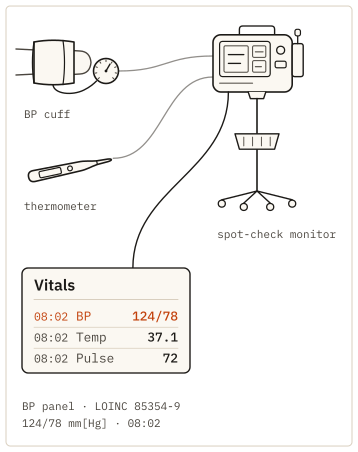
A spot-check monitor takes blood pressure, pulse and temperature at the bedside, and a nurse types the numbers into the chart. Kymolog takes the values from the devices instead and files them as one set, linked to the patient's encounter.

BP panel 85354-9 · temperature 8310-5 · Cel · FHIR R4
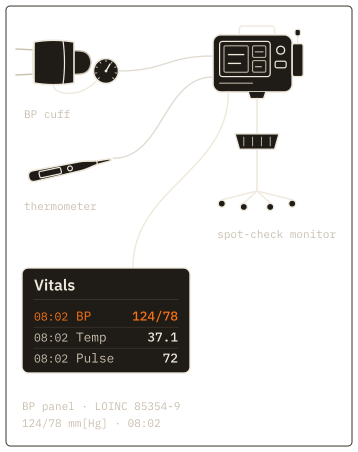
Fig. 1. One spot check from three devices, filed to the chart as one set.

A spot check as one coded set

At 08:05 the cuff reads 118/76 with a pulse of 72, and the thermometer reads 37.1. The Kymolog™ edge agent sends the three together as a Bundle, the container that Fast Healthcare Interoperability Resources (FHIR) uses to send related records in one piece.

Blood pressure goes in as a panel, LOINC 85354-9, with systolic 8480-6 and diastolic 8462-4 in mmHg. Body temperature is LOINC 8310-5 in Cel, the UCUM code for degrees Celsius, and a thermometer set to Fahrenheit is converted on the way in. Every Observation in the set names the same patient, encounter and time, so the chart and a study dataset both read it as one check.

Example reading: 118/76 and 37.1 at 08:05

A vitals set as one encounter-linked bundleA bedside spot check at 08:05 filed as one FHIR R4 Bundle of three Observations. The blood pressure panel, LOINC 85354-9, holds systolic 8480-6, 118 mm[Hg], and diastolic 8462-4, 76 mm[Hg], shown in red. Body temperature, LOINC 8310-5, is 37.1 Cel. Heart rate, LOINC 8867-4, is 72 /min. Every Observation carries the same effective time 08:05, the subject Patient/p-041 and the encounter Encounter/enc-5310, and a line from each runs to that one Encounter, which comes from the EHR.FHIR R4 BUNDLE, TRANSACTIONObservation  Blood pressure panelLOINC 85354-98480-6  systolic   118 mm[Hg]8462-4  diastolic  76 mm[Hg]08:05 · Patient/p-041 · Encounter/enc-5310Observation  Body temperatureLOINC 8310-537.1 Cel08:05 · Patient/p-041 · Encounter/enc-5310Observation  Heart rateLOINC 8867-472 /min08:05 · Patient/p-041 · Encounter/enc-5310Encounterenc-5310Patient/p-041from the EHR
A vitals set as one encounter-linked bundleA bedside spot check at 08:05 filed as one FHIR R4 Bundle of three Observations. The blood pressure panel, LOINC 85354-9, holds systolic 8480-6, 118 mm[Hg], and diastolic 8462-4, 76 mm[Hg], shown in red. Body temperature, LOINC 8310-5, is 37.1 Cel. Heart rate, LOINC 8867-4, is 72 /min. Every Observation carries the same effective time 08:05, the subject Patient/p-041 and the encounter Encounter/enc-5310, and a line from each runs to that one Encounter, which comes from the EHR.FHIR R4 BUNDLE, TRANSACTIONObservation  Blood pressure panelLOINC 85354-98480-6  systolic   118 mm[Hg]8462-4  diastolic  76 mm[Hg]08:05 · Patient/p-041Encounter/enc-5310Observation  Body temperatureLOINC 8310-537.1 Cel08:05 · Patient/p-041Encounter/enc-5310Observation  Heart rateLOINC 8867-472 /min08:05 · Patient/p-041Encounter/enc-5310Encounterenc-5310 · Patient/p-041from the EHR
Figure 2 as a table
ObservationLOINCValue, UCUM unitEncounter
Blood pressure panel85354-9systolic 118, diastolic 76, mm[Hg]enc-5310
Systolic blood pressure8480-6118 mm[Hg]in the panel
Diastolic blood pressure8462-476 mm[Hg]in the panel
Body temperature8310-537.1 Celenc-5310
Heart rate8867-472 /minenc-5310
Fig. 2. A spot check sent as one FHIR Bundle. Blood pressure, temperature and heart rate each keep their own LOINC code and UCUM unit, and all three point at the same patient and the same encounter, so the set stays together in the chart and in a study.

Vital signs into the EHR

At the 04:00 round, a nurse takes vitals on several patients and charts them afterward at the station. The chart then records when the values were typed rather than when they were measured. Kymolog files each value at the time the device took it, under the patient its bed or its assignment points to.

Vital signs integration then needs no interface per device. The cuff and the thermometer are two manifests, and the EHR receives coded results by FHIR R4 or by HL7 v2 message. Kymolog delivers them to every EHR on our delivery list.

Vital signs into the EHR: auto-send or review firstTwo devices with different workflow modes feed one EHR flowsheet. The BP cuff is set to auto-send: its 08:05 reading, 118/76 mm[Hg] with heart rate 72 /min, goes straight into the chart. The thermometer is set to review first: its 08:05 reading, 37.1 Cel, shown in red, waits in the review queue with status preliminary until a nurse approves it at 08:09, then files with status final. In the flowsheet both sit in the 08:05 column, the time the readings were taken, beside the 04:05 column: BP 122/78 then 118/76, heart rate 70 then 72, temperature 36.9 then 37.1.BP cuff118/76 mm[Hg]HR 72 /min, 08:05mode: auto-sendThermometer37.1 Cel, 08:05mode: review firstReview queuestatus preliminaryapproved 08:09status finalEHR FLOWSHEET, VITALS04:0508:05BP mm[Hg]122/78118/76HR /min7072Temp Cel36.937.1auto-sendapprovedboth charted at 08:05, when taken
Figure 3 as a table
DeviceModeReadingPath
BP cuffauto-send08:05: 118/76 mm[Hg], heart rate 72 /minfiled as final at once
Thermometerreview first08:05: 37.1 Celpreliminary in the review queue, approved at 08:09, then final
Fig. 3. Each device type is set to send straight to the chart or to wait for review. Either way the reading is charted at the time it was taken, and the review leaves its approval on the record.

Bring the spot-check monitor class from one unit, plus that unit's EHR. The demo files a full vitals set into a test flowsheet, timed to the check itself.

Request a demo

Automated vital signs, sent straight in or reviewed

Each device type carries one setting. Auto-send files readings as final when they arrive; review-required holds them as preliminary until a nurse approves them. The approval stays on the record, with who approved the value and when.

Automated vitals capture covers continuous body temperature monitoring as well. A probe that reports every few minutes has every value filed separately, as an Observation, the same way a spot check is. Blood pressure telemonitoring follows the same path. A home cuff that reports over HTTPS is one more device of the cuff class, and each reading keeps its home measurement time.

Vital signs data for research

Each spot check stays in the study copy as coded rows that share one encounter. A study can line up blood pressure, pulse and temperature taken together without matching times by hand. Each row names its cuff or thermometer, with a serial number and a unique device identifier (UDI). Rows also keep mean arterial pressure where the cuff reports it.

Clinic and home readings use the same fields, so a trial's take-home cuffs and its site visits form one series. Every field a row records about its device is listed on the page about reading provenance.

Send us the vital signs devices on your unit

Tell us which cuffs, thermometers and spot-check monitors one unit uses, and which EHR it charts in. We reply within one business day with times to talk. On the call we file one vitals set into a test chart and open it as study rows.

Request a demo