

How device data capture works, from the edge agent to the EHR
Kymolog has four components: the edge agent, the hub, the FHIR store and the research store. This page follows a glucose reading of 132 mg/dL through each of them and into your EHR.
Four components and your EHR · LOINC and UCUM at the edge · on premises or in a cloud


Components between the device and the EHR
A reading passes through four Kymolog™ components and your EHR, in the order the drawing numbers them. The edge agent and the hub carry no patient details. The patient is attached at the third, the FHIR store. It keeps each reading as a Fast Healthcare Interoperability Resources (FHIR) R4 record and sends it two ways: to the EHR and to the research store.
Figure 2 as a table
| Part | What it does with the reading |
|---|---|
| 1. Edge agent | Reads the device and codes each reading as a FHIR R4 Observation with LOINC and UCUM; no patient data |
| 2. Hub | Checks the agent and forwards the reading; stores nothing |
| 3. FHIR store | Keeps the record and matches the patient by bed |
| 4. EHR | Receives the result over FHIR R4 or HL7 v2; it shows in the chart like a lab result |
| 5. Research store | Keeps the same coded record for studies |
Device data capture at the edge agent
The agent runs on the same network segment as the devices. It reads each device through that device's own interface: lines on a serial port for most, and an HTTPS listener for devices that push their results.
The device-to-FHIR conversion happens here and nowhere else. Each value becomes a FHIR R4 Observation that names its device and carries no patient. The agent also reports the device's health, such as battery, signal and uptime.
The hub forwards readings without storing them
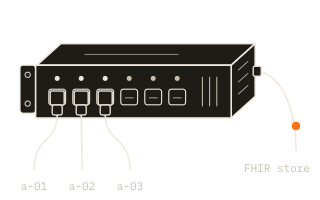
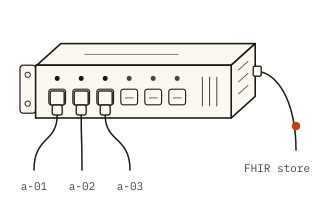
Every agent connects to the hub over TLS and proves its identity with a signed token that works once; only then does the hub take its readings. The hub acknowledges each reading it receives, and the agent resends any reading until it is acknowledged; the hub drops the duplicates. It passes readings to the FHIR store and keeps no database of its own.
The FHIR store attaches the patient
At the FHIR store, automation finds the device's bed, asks the EHR who was in it at that moment, and links the patient and encounter to the reading.
The same automation sets the reading to final when its device type is on auto-send, and to preliminary when the type is on review. A change to the record adds a version rather than overwriting one. See bed matching on a hospital ward.
Device data to EHR, and the same record to research
Final readings go to the EHR over FHIR R4 or as HL7 v2 results, and appear among the chart's results the way a lab value does. The research store keeps the same coded record for studies, linked to the same encounter. A study dataset and the chart then hold the same values. For research on the rest of the patient record, such as diagnoses, labs and medications, we built Clinical Extract.
Device data normalization, field by field
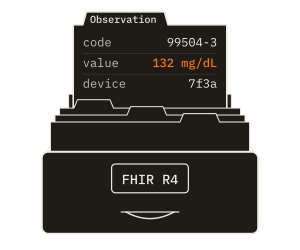
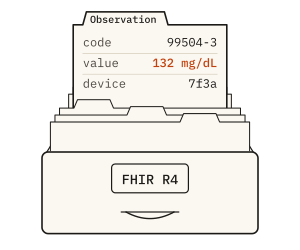
A continuous glucose monitor (CGM) writes one line per reading: the time, the word glucose, 132 and mg/dL. A metadata line before it names the sensor as device 7f3a. The agent maps each field to a standard code once, at capture.
The measure becomes LOINC 99504-3, Glucose [Mass/volume] in Interstitial fluid, and the unit becomes the UCUM code mg/dL. The local time becomes an ISO 8601 timestamp with its UTC offset, and the device id a reference to the Device record. The EHR and the research store read the same code and unit, so no system downstream recodes them.
Figure 3 as a table
| Device field | Coded as | In the Observation |
|---|---|---|
| glucose | LOINC 99504-3, Glucose [Mass/volume] in Interstitial fluid | code. |
| 132 | 132 (a number) | valueQuantity. |
| mg/dL | UCUM mg/dL | valueQuantity. |
| 08:02:00 | 2026-10-03 | effective |
| 7f3a | Device/ | device |
LOINC device mapping from a manifest
Each device type has a manifest that maps its fields to LOINC codes and UCUM units, with normal ranges and any panel structure. Onboarding a new device type means writing its manifest. That takes 2–4 hours for a simple device, and 4–8 for a panel such as blood pressure.
Where the install runs, and where the research store sits
The edge agent always sits beside the devices, and your EHR remains the hospital's own system. The hub and the FHIR store run on your own servers or in your own private cloud, or in a device maker's cloud when the maker runs them for you; patient data then travels to that cloud, and results come back to your EHR. The agents and the hub hold device ids and values only. The patient is attached at the FHIR store, which feeds your EHR.
The research store sits inside the same boundary, or in our cloud. Any reading bound for our cloud is de-identified first, inside the boundary, so a hosted research store never holds identified data. Sites that join the data network, a separate add-on service we run, send it consented, de-identified readings the same way. More on the install's security model.
Figure 4 as a table
| Where | What runs there | Patient data |
|---|---|---|
| The hospital, in every deployment | Bedside device, edge agent (1), your EHR (4) | A device id only at the agent; the chart in the EHR |
| The back end: the hospital’s premises or private cloud, or a device maker’s cloud | Hub (2), FHIR store (3), research store kept beside it (5), de-identify (allowlist, tokens, shifted dates) | Matched by bed at the FHIR store; the hub carries a device id only |
| Saga’s cloud | Research store hosted by Saga (5); data network (optional add-on) | De-identified readings only |
Ask for a walkthrough with your devices
Tell us one device class and the EHR it should reach. The demo runs a reading from that class through all five parts, into a test chart and the research store. We reply within one business day with times to talk.