

Medical device connectivity for bedside readings, matched to the patient by bed
Bedside monitors already measure the values your nurses copy into the flowsheet. An edge agent on the unit takes each value from the device, and Kymolog charts it for the patient the EHR has in that bed.
Bed matching · review queue · FHIR R4 or HL7 v2 · on premises or private cloud
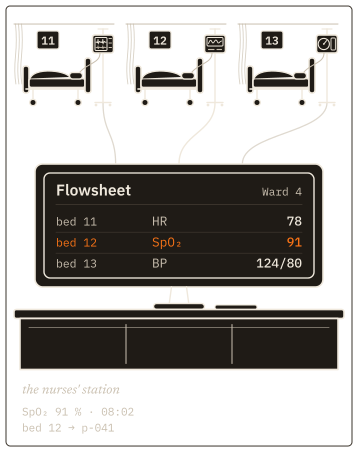
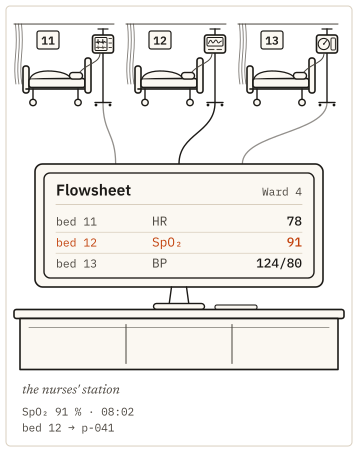
Bedside medical device integration on the unit's own network
A pulse oximeter at bed 12 reports oxygen saturation (SpO₂) of 91% at 08:02. The Kymolog™ edge agent sits on the ward's network, next to the devices. It collects the value straight from the device, whether the device writes to a serial port or posts its results over HTTPS. It codes the value as a Fast Healthcare Interoperability Resources (FHIR) R4 Observation, with a LOINC code and a UCUM unit.
The same agent reads blood pressure cuffs, thermometers, electrocardiogram (ECG) monitors and continuous glucose monitors (CGMs). Your clinical engineering team adds any other class, a patient monitor included, by configuration: a file listing what it measures and in which units.
Matched readings reach the chart in the seven EHRs we deliver to, over FHIR R4 or through your HL7 v2 interface engine. Where that engine needs a new route for the feed, we build it through Saga IT's integration services.
Matching a reading to the patient in that bed
The agent sends each reading with a device id and a time but no patient details. Kymolog looks up the bed that device is assigned to, then asks the EHR who occupied the bed at that minute. The EHR returns the encounter, and Kymolog takes the patient from it.
The EHR stays the source of truth for beds and patients, so a transfer charted there changes the next match. When the bed was empty at that minute, held two patients or the EHR did not answer, Kymolog holds the reading as preliminary until a nurse assigns it.
A device that travels with the patient, such as a transport monitor, is assigned to the patient directly. Kymolog files its readings through that assignment as the patient moves between beds.
Figure 2 as a table
| Step | Question | Answer |
|---|---|---|
| Reading | What arrived? | SpO₂ 96 % from device 2b8d at 08:02, with no patient |
| Bed | Where is device 2b8d? | Bed 4W-12 |
| Encounter | Who was in bed 4W-12 at 08:02? | Encounter e-5531, from the EHR |
| Patient | Whose encounter is it? | p-041, linked to the reading |
| Held | No one in the bed, or two? | The reading waits in the review queue |
Nurses approve held readings from one queue
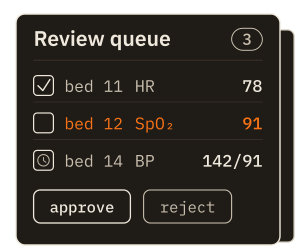
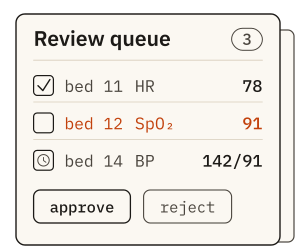
Readings from a device type set to review-required wait in the queue until a nurse acts on them. The nurse approves bed 12's SpO₂ of 91%, rejects a reading taken with the probe off the finger, or moves a misfiled reading to the right patient. Kymolog logs each action with the user and the time.
If your EHR supports SMART on FHIR, nurses can open the queue from inside the patient's chart. Launch from Epic works today, and each deployment decides whether to turn it on.
An unresolved view lists readings that matched no one, so they can be placed by hand. Readings the EHR refuses go to an error queue, where users with the retry permission send them again.
Each device type starts on review or on auto-send, and the setting can change once a unit trusts the feed. Who may approve, reject, approve in bulk or reassign is a permission per role.
Bring the device list for one unit and the name of your EHR. We take a reading from one of those devices into a test chart, matched to a test patient by bed.
Scope a one-unit device-to-EHR pilotDevice health for biomed and clinical engineering
A biomed technician registers each device once, assigns it to a bed and sets it to active, inactive or maintenance. Its health panel then shows battery, signal strength, connection type, uptime and the last check-in.
When a device stops reporting, the technician can reboot it, restart its services, pull its logs or push a new configuration from the same screen, without going to the bedside. Health readings are stored beside the clinical values, so a fault can be read against the readings around it.
Biomed is one of five roles Kymolog ships with, alongside Super Admin, Physician, Charge Nurse and Nurse. Each role has its own permissions, and your administrators can override them for one user.
Hosted on hospital servers or a private cloud
Kymolog installs on servers you own or in a private cloud account you control. The edge agents and the hub carry device ids and values but no patient details, so the device network holds no patient data. The patient is attached further in, at the FHIR store.
A device maker can also run Kymolog for you in its own cloud. Your patient data then travels to that cloud and is held there under your agreement with the maker. Either way, the install de-identifies readings before they leave for our cloud, whether for research storage or the data network.
Each agent proves its identity to the hub with a signed, single-use token before the hub accepts a reading. Kymolog's own connections are encrypted with TLS. For your security review, we answer questionnaires in SIG, HECVAT or your own format.
Charting without transcription
A nurse reads 96% off the monitor, writes it down, opens the patient's flowsheet, finds the row for the time, types the value and signs the entry. The value is copied twice by hand on its way in. The chart keeps no record of which device took it.
With Kymolog, nobody transcribes the value. The agent takes it from the device and Kymolog matches it by bed. The nurse's part is one approval in the review queue, or nothing at all for auto-send device types. The flowsheet entry records the device that took the reading and the minute it was taken.
Figure 3 as a table
| Step | By hand | With Kymolog |
|---|---|---|
| 1 | Read the value off the monitor | The edge agent takes the value as the device measures it (automatic) |
| 2 | Write it down (copied by hand) | Matched to the patient by bed (automatic) |
| 3 | Open the patient’s flowsheet | A nurse approves it in the review queue; auto-send devices skip this |
| 4 | Find the row for the time | |
| 5 | Type the value in (copied by hand) | |
| 6 | Sign the entry | |
| Result | In the chart, as typed | In the chart, with its device and time |
Talk to us about a pilot unit
To compare medical device connectivity solutions on your own ward, start with a pilot. It puts one device class on one unit on review-required, so nurses approve each reading while you check the feed against their charting. It runs against your EHR test system first, then live. We reply within one business day with times to talk.