
Medical device integration that files every reading in the EHR

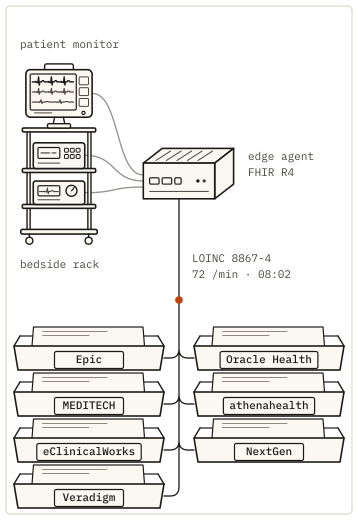
An edge agent beside the devices reads each value as it is taken and codes it as a FHIR R4 Observation with LOINC and UCUM. Kymolog matches it to the patient by bed and delivers it to your EHR over FHIR R4 or HL7 v2.

FHIR R4 · HL7 v2 · LOINC · UCUM
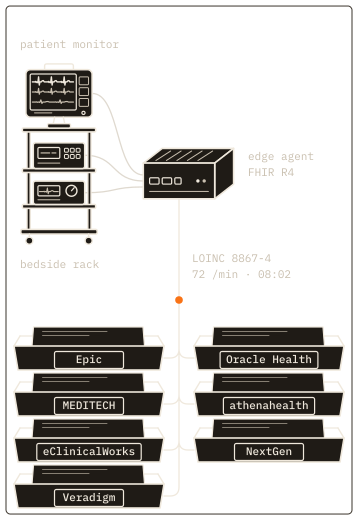
Fig. 1. An edge agent at the bedside, and seven filing trays for the EHRs it delivers to.

What medical device integration means
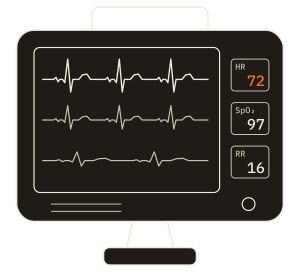
Medical device integration is the work of getting what a device measures into the patient's record without anyone retyping it. A nurse reads 118/82 off a blood pressure cuff and types it into a flowsheet; integration removes that step. The usual definition has four parts: capture the value from the device, put it in a form the EHR understands, attach it to the right patient and encounter, and deliver it.

Medical device interoperability is the wider goal of devices and systems exchanging data with the same meaning. Medical device integration software is how a hospital reaches that goal for the devices it already owns. Integration moves documented values into the record; alarms and live monitoring stay on the bedside monitor.

How Kymolog does it
Kymolog™ handles readings from every device class in the same five steps. The usual definition leaves out step 3, which stamps each reading with its device and time so the same record can be used for research.

  1. Capture at the edge agent

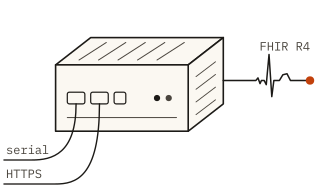
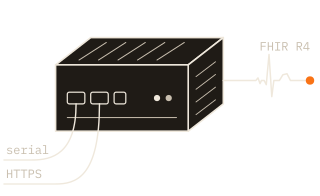
    A small agent runs beside the devices, on the unit's network. It takes each value from the device's own output, over a serial connection or an HTTPS push, the moment the device sends it.

  2. Code to FHIR R4

    The agent writes the value as an Observation in FHIR R4, the HL7 standard named Fast Healthcare Interoperability Resources. LOINC identifies the measurement and UCUM its unit. A continuous glucose monitor (CGM) value becomes LOINC 99504-3 in mg/dL; a blood pressure becomes one panel with systolic and diastolic components.

  3. Stamp the device and the time

    Every Observation names its device, down to the serial number and unique device identifier (UDI), and the moment of measurement, to the millisecond. No patient data leaves the edge with it.

  4. Link the patient, encounter and bed

    Kymolog then looks up who was in the device's bed at the moment of the reading and attaches that patient and encounter. When the bed is empty or the match is unclear, Kymolog holds the reading for a reviewer rather than pick a patient.

  5. Deliver to the EHR

    Readings from auto-send device types go straight to the chart; readings from review-required types pass through the review queue first. Either way the reading reaches the EHR over FHIR R4 or HL7 v2 and lands where clinicians already read results.

The pipeline: capture, code, link, deliverFour stages in a row, each adding to one CGM reading. 1, capture, at the edge agent by the bed: the value 132 mg/dL, in red, the time 08:02:00 and device 7f3a, read from the device’s own output. 2, code, also at the edge agent: a FHIR R4 Observation with LOINC 99504-3 and the UCUM unit mg/dL, status registered, with no patient yet. 3, link, at Kymolog’s FHIR store, wherever the install runs: bed 12 at 08:02 gives Patient/p-041 and Encounter/e-2207, and the status becomes final, or the reading is held for review. 4, deliver, into the EHR: a FHIR R4 Observation or an HL7 v2 ORU^R01 message, to Epic, Oracle Health, MEDITECH, athenahealth, eClinicalWorks, NextGen or Veradigm.at the bedside: edge agentKymolog’s FHIR storeyour EHR1CAPTURE132 mg/dL08:02:00device 7f3aread from thedevice’s own output2CODEFHIR R4 ObservationLOINC 99504-3UCUM mg/dLstatus registeredno patient yet3LINKbed 12 at 08:02Patient/p-041Encounter/e-2207status final, orheld for review4DELIVERFHIR R4 Observationor HL7 v2 ORU^R01Epic, Oracle Health,MEDITECH,athenahealth,eClinicalWorks,NextGen, Veradigm
The pipeline: capture, code, link, deliverFour stages in a row, each adding to one CGM reading. 1, capture, at the edge agent by the bed: the value 132 mg/dL, in red, the time 08:02:00 and device 7f3a, read from the device’s own output. 2, code, also at the edge agent: a FHIR R4 Observation with LOINC 99504-3 and the UCUM unit mg/dL, status registered, with no patient yet. 3, link, at Kymolog’s FHIR store, wherever the install runs: bed 12 at 08:02 gives Patient/p-041 and Encounter/e-2207, and the status becomes final, or the reading is held for review. 4, deliver, into the EHR: a FHIR R4 Observation or an HL7 v2 ORU^R01 message, to Epic, Oracle Health, MEDITECH, athenahealth, eClinicalWorks, NextGen or Veradigm.1CAPTUREedge agent132 mg/dL08:02:00device 7f3aread from the device’s own output2CODEedge agentFHIR R4 ObservationLOINC 99504-3UCUM mg/dLstatus registeredno patient yet3LINKKymolog’s FHIR storebed 12 at 08:02Patient/p-041Encounter/e-2207status final, or held for review4DELIVERyour EHRFHIR R4 Observationor HL7 v2 ORU^R01Epic, Oracle Health, MEDITECH, athenahealth,eClinicalWorks, NextGen, Veradigm
Figure 2 as a table
StageWhere it runsWhat it adds to the reading
1. Captureedge agentvalue 132 mg/dL, time 08:02:00, device 7f3a
2. Codeedge agentFHIR R4 Observation, LOINC 99504-3, UCUM mg/dL; status registered, no patient yet
3. LinkKymolog’s FHIR store, wherever the install runsbed 12 at 08:02: Patient/p-041, Encounter/e-2207; status final, or held for review
4. Deliverinto the EHRFHIR R4 Observation or HL7 v2 ORU^R01, to Epic, Oracle Health, MEDITECH, athenahealth, eClinicalWorks, NextGen or Veradigm
Fig. 2. The pipeline, stage by stage. The edge agent captures the value and codes it; Kymolog links it to the patient in that bed at that time, or through the sensor’s assignment to a patient; then it is delivered into the EHR over FHIR R4 or HL7 v2.

Adding a device type

A new device type is added with a configuration file, without development work. Its manifest lists the LOINC codes, units, normal ranges and panel structure, and Kymolog builds the EHR mapping from that file. A simple device takes 2–4 hours to onboard and a panel device 4–8. Blood pressure cuffs, thermometers, pulse oximeters for oxygen saturation (SpO₂), electrocardiogram (ECG) monitors and CGMs are onboarded this way, and new classes follow the same path.

The EHRs we deliver to
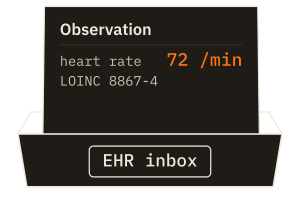
Kymolog delivers device readings into these seven EHRs. Each hospital picks the path its interface team already runs: FHIR R4 through the EHR's API, or HL7 v2 results through its interface engine.

  • Device data into Epic

    Each reading is filed as a FHIR R4 vital-sign Observation, which Epic writes to a flowsheet row, or sent as an HL7 v2 ORU result.

  • Oracle Health (Cerner) device integration

    Readings go into Millennium through its FHIR R4 API, or as HL7 v2 ORU results.

  • MEDITECH device integration

    Readings reach MEDITECH as HL7 v2 ORU results over an MLLP interface.

  • athenahealth device integration

    Readings reach athenahealth as HL7 v2 ORU results.

  • eClinicalWorks device integration

    Each reading reaches eClinicalWorks as an HL7 v2 ORU result.

  • NextGen device integration

    NextGen takes each reading as an HL7 v2 ORU result over MLLP.

  • Veradigm device integration

    Readings arrive in Veradigm as HL7 v2 ORU results.

When a site wants help with the Epic side of the build, we take that on through Saga IT's Epic integration services.

FHIR R4 or HL7 v2, whichever the site runs

One reading, as FHIR R4 or as HL7 v2The same CGM reading in the two formats Kymolog delivers. Left, FHIR R4: an Observation sent by POST to the EHR’s FHIR endpoint, with status final, code LOINC 99504-3, subject Patient/p-041, encounter Encounter/e-2207, effectiveDateTime 2026-10-03T08:02:00-04:00, valueQuantity 132 mg/dL with the UCUM system, and device Device/7f3a. Right, HL7 v2.5.1: an ORU^R01 message sent over MLLP. Its OBX segment as sent, then field by field: PID-3 p-041, PV1-3 3E^^12 (unit 3E, bed 12), OBX-2 NM (numeric), OBX-3 99504-3, Glucose [Mass/volume] in Interstitial fluid, LN, OBX-5 132, OBX-6 mg/dL^^UCUM, OBX-11 F (final), OBX-14 20261003080200-0400 and OBX-18 7f3a. Numbered markers pair the parts: 1 what was measured, code and OBX-3; 2 the value, in red, valueQuantity.value and OBX-5; 3 its UCUM unit, valueQuantity and OBX-6; 4 when it was taken, effectiveDateTime and OBX-14; 5 the device, device and OBX-18; 6 the patient, subject and PID-3; 7 the visit and bed, encounter and PV1-3; 8 the result status, status and OBX-11.FHIR R4POST [base]/Observation{  "resourceType": "Observation",  "status": "final",  "code": { "coding": [{    "system": "http://loinc.org",    "code": "99504-3" }] },  "subject": {    "reference": "Patient/p-041" },  "encounter": {    "reference": "Encounter/e-2207" },  "effectiveDateTime":    "2026-10-03T08:02:00-04:00",  "valueQuantity": {    "value": 132,    "unit": "mg/dL",    "system": "http://unitsofmeasure.org",    "code": "mg/dL" },  "device": {    "reference": "Device/7f3a" }}12345678HL7 v2.5.1ORU^R01 over MLLPthe OBX segment, as sentOBX|1|NM|99504-3^Glucose [Mass/volume] in  Interstitial fluid^LN||132|mg/dL^^UCUM|  ||||F|||20261003080200-0400||||7f3afield by fieldPID-3   p-041^^^HOSP^MRPV1-3   3E^^12OBX-2   NMOBX-3   99504-3^Glucose [Mass/volume]        in Interstitial fluid^LNOBX-5   132OBX-6   mg/dL^^UCUMOBX-11  FOBX-14  20261003080200-0400OBX-18  7f3a123456781what was measuredcode · OBX-32the valuevalue · OBX-53its UCUM unitunit · OBX-64when it was takeneffective · OBX-145the devicedevice · OBX-186the patientsubject · PID-37the visit and bedencounter · PV1-38result statusstatus · OBX-11
Figure 3 as a table
FactFHIR R4 ObservationHL7 v2 ORU^R01
what was measuredcode: LOINC 99504-3OBX-3: 99504-3^…^LN
the valuevalueQuantity.value: 132OBX-5: 132 (OBX-2 NM)
its unitvalueQuantity: mg/dL, UCUMOBX-6: mg/dL^^UCUM
when it was takeneffectiveDateTime: 2026-10-03T08:02:00-04:00OBX-14: 20261003080200-0400
the devicedevice: Device/7f3aOBX-18: 7f3a
the patientsubject: Patient/p-041PID-3: p-041
the visit and bedencounter: Encounter/e-2207PV1-3: 3E^^12
result statusstatus: finalOBX-11: F
Fig. 3. The same reading as a FHIR R4 Observation and as an HL7 v2 ORU^R01 message. Both carry the same eight facts: the LOINC code, the value, its UCUM unit, the time it was taken, the device, the patient, the bed and the result status.

On the FHIR path, Kymolog posts each reading to the EHR's FHIR endpoint as an Observation, with its LOINC code, UCUM unit, patient, encounter, time and device. On the HL7 v2 path, it sends the same reading as an ORU^R01 result message over MLLP. The OBX segment carries the code in OBX-3, the value in OBX-5, the unit in OBX-6, the time in OBX-14 and the device in OBX-18.

Both paths carry the same code, value, unit, time and device. A site can start on its HL7 v2 interface engine and move to FHIR later without changing how any device is coded.

Name one device type and the EHR you run. The demo follows a reading from that device class into a test chart, coded and matched by bed.

Request a demo

Reviewing held readings in the queue

Held readings wait in the review queue as preliminary. Clinicians with review rights see each one with its patient, bed, device, value, unit and time. They approve or reject it in one click, singly or in bulk, or reassign it to the right patient when the bed match failed. Kymolog records who acted on each reading, and when.

Where the hospital's EHR supports SMART on FHIR, clinicians can open the review queue inside the chart. Epic launch works today, and each deployment chooses whether to use it.

Approved readings file to the chart as final, and rejected readings are not sent. Review is a setting per device type, so a hospital can start every type on review and move trusted types to auto-send later.

The review queueHow a linked reading reaches the chart. Readings from auto-send device types are filed as final. Readings from review-required device types, or with no patient in the bed, are held as preliminary in the review queue. The queue lists four held readings: at 08:02, patient p-041 in bed 12, CGM 7f3a, glucose 132 mg/dL, preliminary, highlighted; at 08:01, p-017 in bed 7, blood pressure cuff 2c91, 118/82 mm[Hg], preliminary; at 07:59, no patient in bed 9, pulse oximeter 51d0, SpO₂ 95 %, unresolved; at 07:55, p-033 in bed 4, ECG 9e12, QTc 452 ms, preliminary. Each row offers approve and reject, or edit patient when unresolved. Approve files the reading in the chart as final, with who approved it and when. Reject keeps it out of the chart. Edit patient links the reading to the right patient, and it can then be approved.a linked readingauto-send device typereview-required, or no patient in the bedfinal: filed in the chartpreliminary: held for reviewREVIEW QUEUEheld for reviewTIMEPATIENTBEDDEVICEREADINGVALUESTATUS08:02p-04112CGM 7f3aGlucose, CGM132 mg/dLpreliminaryapprovereject08:01p-0177BP 2c91Blood pressure118/82 mm[Hg]preliminaryapprovereject07:59none9SpO₂ 51d0SpO₂95 %unresolvededit patient07:55p-0334ECG 9e12QTc452 mspreliminaryapproverejectapprovestatus final: filed in the chart, with who approved it and whenrejectkept out of the chartedit patientlinked to the right patient, then ready to approve
The review queueHow a linked reading reaches the chart. Readings from auto-send device types are filed as final. Readings from review-required device types, or with no patient in the bed, are held as preliminary in the review queue. The queue lists four held readings: at 08:02, patient p-041 in bed 12, CGM 7f3a, glucose 132 mg/dL, preliminary, highlighted; at 08:01, p-017 in bed 7, blood pressure cuff 2c91, 118/82 mm[Hg], preliminary; at 07:59, no patient in bed 9, pulse oximeter 51d0, SpO₂ 95 %, unresolved; at 07:55, p-033 in bed 4, ECG 9e12, QTc 452 ms, preliminary. Each row offers approve and reject, or edit patient when unresolved. Approve files the reading in the chart as final, with who approved it and when. Reject keeps it out of the chart. Edit patient links the reading to the right patient, and it can then be approved.a linked readingauto-send device typefinal: filed in the chartreview-required, or no patient in the bedpreliminary: held for reviewREVIEW QUEUEheld for review08:02  p-041  bed 12  CGM 7f3aGlucose, CGM  132 mg/dLpreliminaryrejectapprove08:01  p-017  bed 7  BP 2c91Blood pressure  118/82 mm[Hg]preliminaryrejectapprove07:59  no patient  bed 9  SpO₂ 51d0SpO₂  95 %unresolvededit patient07:55  p-033  bed 4  ECG 9e12QTc  452 mspreliminaryrejectapproveapprovestatus final: filed in thechart, with who approved it andwhenrejectkept out of the chartedit patientlinked to the right patient,then ready to approve
Figure 4 as a table
TimePatient, bed, deviceReadingStatus
08:02p-041, bed 12, CGM 7f3aglucose 132 mg/dLpreliminary: approve or reject
08:01p-017, bed 7, BP cuff 2c91blood pressure 118/82 mm[Hg]preliminary: approve or reject
07:59no patient, bed 9, pulse oximeter 51d0SpO₂ 95 %unresolved: edit patient
07:55p-033, bed 4, ECG 9e12QTc 452 mspreliminary: approve or reject
Fig. 4. The review queue. Device types set to review-required, and readings with no patient in the bed, wait here as preliminary until someone approves, rejects or re-links them; auto-send types skip it.

Run by your team or by a device maker

The edge agent sits beside the devices, on the unit's network. The rest of the install runs on your own hardware or in a private cloud you control, on a standard Linux host with a container runtime. A device maker can also run it for its hospital customers, in the maker's own cloud; patient data then goes to that cloud under the maker's agreement with each hospital, and results come back to the hospital's EHR.

The edge agent carries no patient details, and patients are matched inside the install, which keeps Kymolog's own copy of every reading. Each agent opens its own TLS 1.3 connection out to the hub on a standard port, so the hub never reaches into the unit's network.

Read more about security and where patient data goes.

Integration for device makers

Device makers face the same problem from the other side: one EHR integration per vendor, then more work at every hospital. With Kymolog at the hospital or in your own cloud, your device's readings arrive coded the same way at every site, and the same records can feed your post-market studies.

Kymolog for device makers

Plan an integration pilot with us

A pilot covers one unit and one device class, first in your EHR's test environment and then live on that unit. We scope it with your clinical engineering and interface teams. If the pilot needs interface work outside Kymolog, such as a new interface-engine route, we do that through Saga IT's integration services. We reply within one business day with times to talk.

Scope a one-unit device-to-EHR pilot