

Epic flowsheet rows and the build behind them
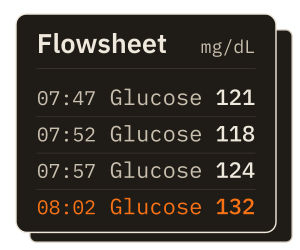
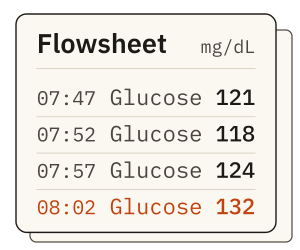
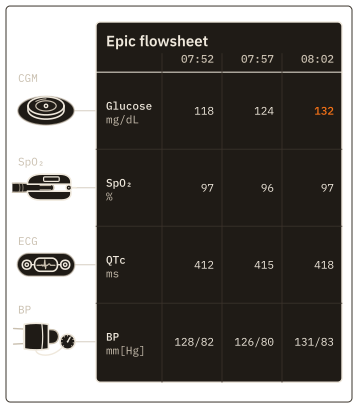
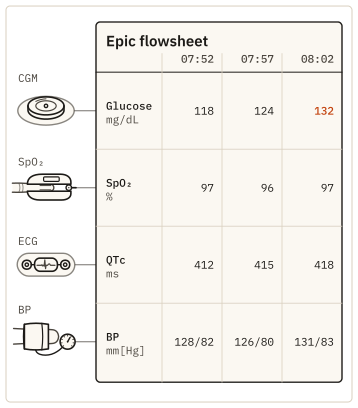
At 08:02 a nurse reads 132 mg/dL off the patient's continuous glucose monitor (CGM) and enters it in the glucose row of the flowsheet. An Epic flowsheet is that grid: one row for each measurement and one column for each time, kept for the patient's encounter. Nurses chart vital signs and assessments there and read the trend across a shift.
Each row is defined in the site's flowsheet build, with its own name, ID and display units. Two hospitals on Epic can chart the same glucose value in rows with different names, so device data has to be mapped to the rows each site already uses. This guide uses generic row names such as "Glucose, CGM" and "QTc"; your build has its own.
From the bedside device to the flowsheet row
Kymolog™ takes a device reading into Epic in four steps. The edge agent next to the devices does the first, and the Kymolog install does the rest. Epic is one of the seven EHRs we deliver to, and this guide follows the Epic side.
-
Capture and code at the edge
The edge agent collects every value the device puts out. Its output is a FHIR R4 Observation (FHIR stands for Fast Healthcare Interoperability Resources) carrying the measurement's LOINC code, a UCUM unit, the device's identity and the time of measurement.
-
Match the bed to a patient
Kymolog finds the patient assigned to the device's bed when the reading was taken, and links the reading to that patient's encounter. The agent holds no patient details, so the match is made later, at Kymolog's FHIR store.
-
Hold or send
Each device type is set to auto-send or review-required. Review-required readings, and any reading without a clear patient match, are held as preliminary until someone reviews them.
-
File to the mapped row
Kymolog sends the final Observation to Epic over FHIR R4 or HL7 v2. The value appears in its mapped flowsheet row, in the column for the time the device took it.
Mapping coded readings to Epic flowsheet rows
Kymolog keeps a row map for each site, and most of the work in Epic flowsheet integration is getting that map right. For each measurement it holds the LOINC code and UCUM unit the reading arrives with, the site's flowsheet row, and the units that row displays. Kymolog builds the entries from each device type's manifest, so one map serves every device of that type on every unit.
Figure 2 as a table
| Coded reading | Value | Epic flowsheet row |
|---|---|---|
| CGM: LOINC 99504-3, glucose in interstitial fluid | 132 mg/dL | Glucose, CGM: 132 mg/dL |
| ECG: LOINC 8636-3, Q-T interval corrected | 452 ms | QTc: 452 ms |
| ECG: LOINC 8867-4, heart rate | 72 /min | Heart rate: 72 /min |
| Vital signs: LOINC 85354-9, blood pressure panel (8480-6 systolic, 8462-4 diastolic) | 118, 82 mm[Hg] | Blood pressure: 118/82 mmHg |
| Vital signs: LOINC 59408-5, oxygen saturation by pulse oximetry | 96 % | SpO₂: 96 % |
| Vital signs: LOINC 8310-5, body temperature | 37.1 Cel | Temperature: 98.8 °F, converted |
The flowsheet row sets the display unit. A thermometer's reading arrives as 37.1 Cel, UCUM's code for degrees Celsius, and Kymolog files it as 98.8 °F when the row charts Fahrenheit. A reading that cannot be filed, for example because its row is not mapped yet, goes to Kymolog's error queue. Staff with retry rights send it again once the map is fixed.
CGM glucose
A CGM sends a glucose value every five minutes as LOINC 99504-3, measured in mg/dL. Each value files to the site's CGM glucose row at its own time, so the flowsheet shows the trend the sensor recorded. The figures in this guide follow the 132 mg/dL reading taken at 08:02.
Electrocardiogram intervals
An electrocardiogram (ECG) monitor reports intervals as well as rate. Kymolog codes the corrected QT interval (QTc) as LOINC 8636-3 in ms and heart rate as LOINC 8867-4, and each maps to its own row. For a patient on a QT-prolonging drug, the nurse sees 452 ms in the QTc row, stamped with the time the monitor measured it.
Vital signs in Epic flowsheets
A pulse oximeter's oxygen saturation (SpO₂) reading, LOINC 59408-5 in %, files to the SpO₂ row. A blood pressure cuff sends one panel, LOINC 85354-9, with systolic 8480-6 and diastolic 8462-4 as its components; the flowsheet shows it as 118/82 in one row. Body temperature, LOINC 8310-5, arrives in Celsius and files in the unit its row charts.
Bring one device class and the flowsheet rows your unit charts it in. The pilot maps that device to those rows in your Epic test environment and runs its readings past a reviewer before they file.
Scope a one-unit device-to-EHR pilotHolding a reading for review before it files
The 08:02 glucose reading sits in Kymolog's review queue, marked preliminary. The nurse checks the value, the patient in bed 12 and the device it came from, then approves it at 08:04. Only then does Kymolog send it to the flowsheet as final, where it files in the 08:02 column. The audit trail keeps who approved it and at what time.
A rejected reading is never filed, and a reading matched to the wrong patient can be reassigned before anyone approves it. Readings with no patient in the bed are held whatever the device type, so a cuff left on an empty bed never charts to its last occupant.
Figure 3 as a table
| Phase | Step | Detail |
|---|---|---|
| Arrive | 1. edge agent to Kymolog: Observation, registered | LOINC 99504-3, 132 mg/dL, Device/7f3a, 08:02:00 |
| Link | 2. Kymolog: bed 12 at 08:02 is Patient/p-041 | Encounter/e-2207 |
| Review | 3. Kymolog: held, status preliminary | review-required device type, or no patient in the bed; auto-send types skip to filing |
| Review | 4. a nurse approves it in the review queue | at 08:04, kept in the audit trail; a rejected reading is never filed |
| File | 5. Kymolog to the Epic flowsheet: Observation, final | FHIR R4, or HL7 v2 ORU^R01 |
| File | 6. Epic flowsheet: 132 mg/dL in the 08:02 column | row "Glucose, CGM", patient p-041 |
Review is set per device type, and it is the validate step for a new device. A unit can start a device type on review-required, compare its readings with what nurses chart by hand, and switch it to auto-send once the values agree. Auto-send readings skip the queue and file as soon as the patient match holds.
Filing to Epic over FHIR R4 or HL7 v2
Through Epic's FHIR R4 API, Kymolog creates each reading as a vital-sign Observation. Epic files it to the one vital-sign flowsheet row that matches the codes the Observation carries, and refuses it when no single row matches. That is why the row map is tested in the site's Epic test environment before any unit goes live.
Sites that run HL7 v2 get an ORU^R01 message for each reading through their interface engine. OBX-3 carries the LOINC code, and OBX-5 and OBX-6 carry the value and its UCUM unit. The site's inbound result interface maps each OBX-3 code to a flowsheet row. Both paths carry the same coded values, so the choice follows what the site's interface team already maintains.
When the Epic side needs interface or flowsheet build work, we do it through Saga IT's Epic integration services. We also publish a deeper reference on Epic's FHIR and HL7 v2 interfaces: Saga IT's Epic integration guide for developers.
Setting up a pilot unit before the first reading files
A clinical engineer, the analyst who owns the flowsheet build and a charge nurse settle four things before the first reading reaches a chart:
- Rows. The flowsheet row each measurement files to, and whether any device class needs a row of its own.
- Units. The unit each row displays, so Kymolog converts where the device and the row differ.
- Review. Which device types start on review-required, and which nurses approve their readings.
- Beds. Which device sits at which bed, since the bed is what ties each reading to a patient.
Adding a device class later means a new manifest and new entries in the row map. A simple device class is onboarded in 2–4 hours, and a panel device such as a blood pressure cuff needs 4–8. The rest of the pipeline, from capture at the bedside to delivery in the EHR, is on the medical device integration page.
Questions about device data in Epic flowsheets
How do you integrate a medical device with Epic flowsheets?
The edge agent next to the device turns each reading into a coded FHIR R4 Observation, and Kymolog files it to the mapped flowsheet row once the patient match holds. The work on the Epic side is the row map and, for HL7 v2, an inbound result interface.
When does a device reading appear in the flowsheet?
An auto-send reading files as soon as Kymolog has matched its patient, and a review-required reading files when a nurse approves it. Either way, it files in the column for the time the device took it rather than the time of approval.
Do device readings need their own flowsheet rows?
Device readings can file to the rows nurses already chart in, or to rows the site builds for device data. Separate rows show at a glance which values came from a device, while shared rows keep one trend per measurement; the choice depends on the site's flowsheet build.
Epic is a trademark of Epic Systems Corporation.